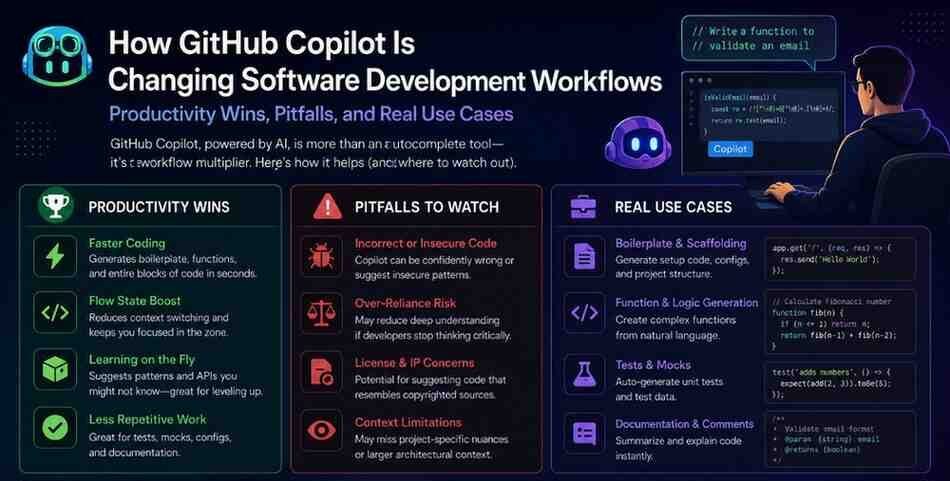






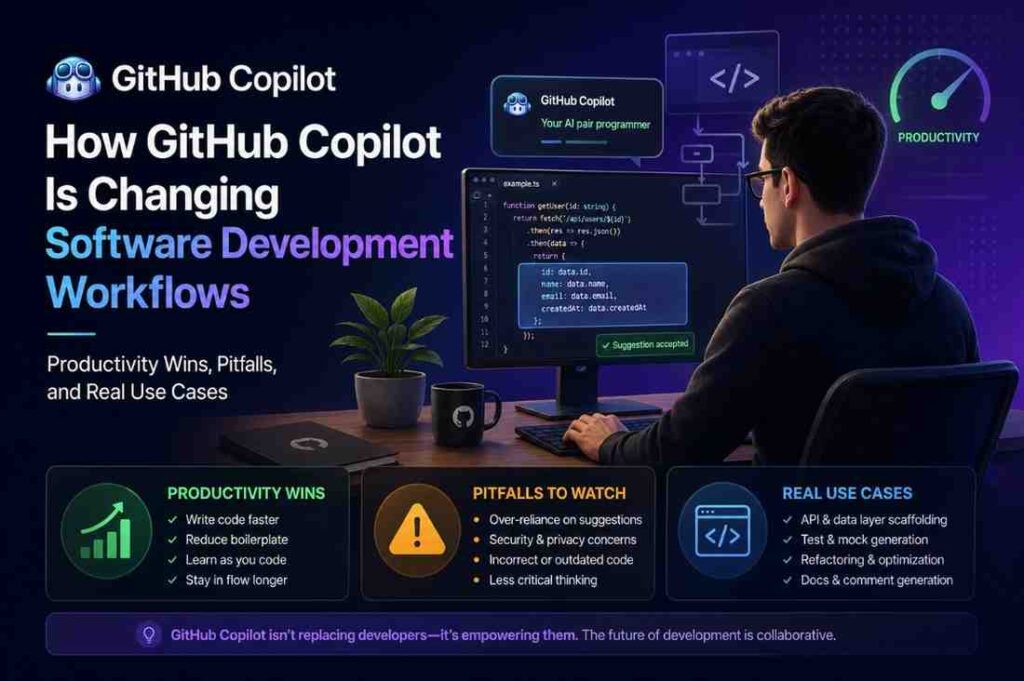
How GitHub Copilot Is Changing Software Development Workflows– GitHub Copilot productivity for software engineers is no longer just a buzzword — it’s a measurable shift in how code gets written, reviewed, and shipped. But like any powerful tool, it comes with real trade-offs worth understanding.
By 2026, GitHub Copilot has become deeply integrated into modern software development workflows. From startups building MVPs at high speed to enterprise engineering teams managing massive codebases, developers are increasingly using AI-assisted coding tools to write code faster, generate tests, automate repetitive tasks, and improve overall productivity.
The impact is hard to ignore. Today, discussions around GitHub Copilot productivity for software engineers appear everywhere — engineering blogs, developer communities, hiring interviews, internal tech discussions, and even performance reviews. For many developers, learning how to work effectively with AI coding assistants is becoming just as important as learning frameworks or cloud platforms.
GitHub Copilot can dramatically speed up development workflows, reduce repetitive coding work, and help engineers move faster. At the same time, it can also introduce poor coding practices, security risks, overreliance on AI, and hidden technical debt if used carelessly.
Table of Contents
What Is GitHub Copilot?
GitHub Copilot is an AI-powered code completion tool built on OpenAI’s Codex model (now updated to newer GPT-4 based architecture). It integrates directly into editors like VS Code, JetBrains IDEs, Neovim, and Visual Studio. Unlike traditional autocomplete, Copilot doesn’t just complete a method name — it can generate entire functions, write unit tests, explain code snippets, and even suggest documentation based on surrounding context.
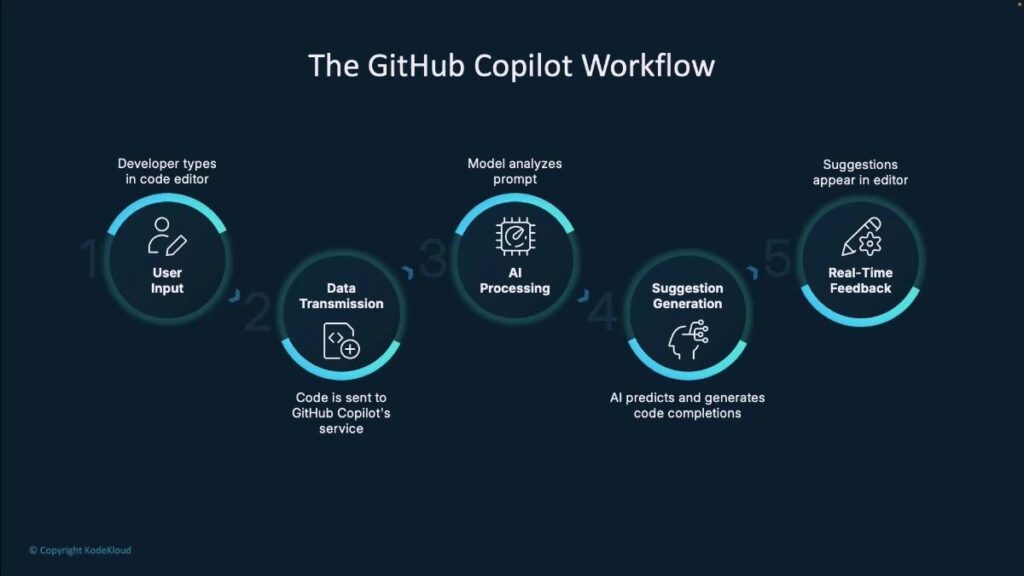
It works by reading your open files, comments, function names, and docstrings — and then predicting what you’re most likely to write next. The suggestions appear inline as “ghost text” and can be accepted with a Tab keystroke.
Key fact: GitHub Copilot is trained on billions of lines of publicly available code, making it particularly strong in languages like Python, JavaScript, TypeScript, Go, and Ruby.
| Feature | GitHub Copilot | Traditional Coding |
|---|---|---|
| Boilerplate Speed | Fast | Manual |
| Learning Curve | Easier | Slower |
| Debugging Help | AI-assisted | Manual |
| Documentation | Auto-generated | Written manually |
| Dependency on Skill | Medium | High |
The Productivity Wins — What the Data Says
When talking about GitHub Copilot productivity for software engineers, it’s important to go beyond anecdotes. GitHub’s own research (which has been independently studied) shows striking results:
55%
46%
73%
88%
These numbers tell a clear story: GitHub Copilot productivity for software engineers is real. But the details matter. These gains are strongest in specific scenarios — let’s look at where Copilot genuinely moves the needle.
1. Boilerplate and Repetitive Code
Every developer knows the pain of writing the same patterns over and over — CRUD operations, API endpoints, config files, data models. Copilot handles these with remarkable accuracy. A senior engineer who might spend 30 minutes scaffolding a REST endpoint can now do it in under 5.
2. Writing Unit Tests
Testing is often the most neglected part of development — not because engineers don’t know it’s important, but because it’s tedious. Copilot can generate test cases from a function signature alone. You write the function; Copilot writes the tests. This alone can save hours per sprint.
3. Exploring Unfamiliar APIs and Libraries
Working with a new SDK or library? Instead of tab-hopping between documentation and your IDE, Copilot can suggest how to use that library based on context. It’s like having a senior engineer next to you who has memorized every library’s documentation.
How GitHub Copilot Works Under the Hood
GitHub Copilot is built on Codex, a descendant of OpenAI’s GPT series fine-tuned specifically on source code. More recent versions use GitHub’s proprietary model improvements that go beyond Codex, with better context window handling and multi-file awareness.
When you start typing in your editor, Copilot sends a “prompt” — which includes your current file, surrounding code, open tabs, and any comments you’ve written — to GitHub’s cloud servers. The model processes this context and returns one or more code suggestions, ranked by probability. All of this happens in milliseconds.
Real Use Cases from Real Engineers
Startup Backend Engineer — Gururo.com Dev Team
A backend engineer at a fast-moving startup used GitHub Copilot to build out their entire authentication system in Python/FastAPI. What normally would’ve taken 2 days (with documentation lookups, writing JWT logic, refresh token handling) was completed in under 6 hours. The engineer guided Copilot with clear function comments and accepted, modified, and rejected suggestions iteratively.
Frontend Developer — React Component Generation
A mid-level frontend developer working on a SaaS dashboard used Copilot to generate reusable React components from design notes. By typing a comment describing the component’s behavior, Copilot scaffolded the JSX, props, and event handlers. The developer reviewed, adjusted styling, and moved on. Their estimate: Copilot saved them roughly 8–10 hours per week on component-level work alone.
Data Engineer — SQL and Pipeline Scripts
A data engineer used Copilot to write complex SQL queries involving multiple JOINs and window functions. Instead of building the query from scratch and manually debugging, they described the desired output in a comment. Copilot generated a near-correct query which needed only minor tuning. GitHub Copilot productivity for software engineers doing data work is often underappreciated — but it’s a strong use case.
The Pitfalls Nobody Talks About
No tool is perfect, and honest coverage of GitHub Copilot productivity for software engineers must include the pitfalls. Here’s what the marketing doesn’t highlight:
1. Security Vulnerabilities
Research from NYU found that Copilot generates insecure code in 40% of cases when the context is security-sensitive (e.g., encryption, input validation, SQL queries). SQL injection patterns, hardcoded secrets, and missing input sanitization have all been spotted in Copilot suggestions. Never blindly trust security-adjacent code from any AI tool.
2. Overconfidence and Hallucination
Copilot sometimes suggests function calls for methods that don’t exist in a library, or uses deprecated APIs. It doesn’t know your runtime version unless you tell it. Engineers who are junior or unfamiliar with a domain may accept these suggestions without realizing the issue.
3. Over-reliance Stunting Growth
This is the nuanced one. Junior developers who lean too heavily on Copilot may complete tasks quickly but miss the learning that comes from solving problems themselves. GitHub Copilot productivity for software engineers is highest when the engineer understands what they’re accepting — not when they’re using it as a crutch.
4. License and IP Concerns
Copilot was trained on public GitHub repositories. There are ongoing legal debates about whether its suggestions could reproduce licensed code. For companies building proprietary software, this remains a risk to monitor, especially in regulated industries.

How to Use GitHub Copilot Effectively
Based on real engineering team workflows (including teams at companies like Gururo, who have integrated AI tooling into their dev culture), here are the practices that maximize GitHub Copilot productivity for software engineers:
- Write descriptive comments before functions. The better your comment, the better Copilot’s suggestion. Treat comments as prompts.
- Use Copilot for first drafts, not final code. Accept suggestions as a starting point, then refactor with intention.
- Pair it with linters and static analysis tools. ESLint, Pylint, Semgrep — these catch what Copilot misses.
- Leverage Copilot Chat for explanations. The chat feature lets you ask “why does this code work?” — great for learning and code review.
- Set up .copilotignore files to prevent Copilot from suggesting based on sensitive or proprietary context.
- Review every generated test. Tests that always pass are worse than no tests. Make sure Copilot-generated tests actually test the right behavior.
- Use Gururo-style knowledge sharing — document your team’s best Copilot prompting patterns in a shared wiki so the whole team benefits.
Pro Tips for Getting the Most Out of GitHub Copilot
After working with GitHub Copilot extensively, experienced developers have identified clear patterns that maximize its usefulness. Here are the most effective strategies:
Write Better Comments First
The quality of GitHub Copilot’s suggestions directly reflects the quality of your context. Instead of diving straight into code, write a brief comment describing what you want to achieve, the inputs and outputs, and any constraints. The more precise your comment, the more accurate the suggestion.
Use Copilot for Test-Driven Development
Write your function signature and docstring first, then ask Copilot to generate tests before you write the implementation. This forces you to clarify your function’s contract up front and results in more rigorous tests.
Review Every Single Suggestion
Develop the habit of reading Copilot’s suggestions critically, not just accepting them. Ask yourself: “Do I understand what this code is doing? Does it handle all edge cases? Is this the most readable approach?” Accepted code you do not understand becomes technical debt.
Leverage Multiple Suggestions
GitHub Copilot can generate multiple alternative suggestions (Ctrl+Enter in VS Code opens a panel of options). When the first suggestion is not quite right, exploring alternatives often surfaces a better approach or sparks a useful idea.
Keep Your Open Tabs Relevant
Since Copilot uses your open editor tabs as context, keep related files open — your models, schemas, and interfaces — especially when working on functions that use those types. This dramatically improves suggestion quality.
Combine Copilot with Code Review
Use GitHub Copilot to accelerate the first draft, then apply your normal code review process rigorously. The best teams treat AI-generated code exactly like human-written code — it must pass linting, testing, and peer review before merging.
Frequently Asked Questions
Does GitHub Copilot make junior developers more productive?
Yes — but with caveats. Junior developers see the biggest raw speed gains on boilerplate tasks, but they must actively review and understand accepted suggestions to avoid accumulating technical debt.
Is GitHub Copilot safe to use at work?
Generally yes, but enterprises should review GitHub Copilot’s data policies, use the Business plan for privacy controls, and configure .copilotignore for sensitive files.
Can GitHub Copilot replace a software engineer?
No. It replaces the mechanical parts of coding — not judgment, architecture decisions, debugging complex systems, or understanding business context. Think of it as removing the grunt work so engineers can focus on harder problems.
What programming languages does GitHub Copilot support best?
Python, JavaScript, TypeScript, Go, Ruby, and Java see the strongest suggestion quality. Niche or newer languages may have weaker suggestions.
How does Gururo recommend integrating Copilot into team workflows?
Gururo recommends treating Copilot like a junior team member — guide it with clear context, always review its output, and share effective prompt patterns across the team through shared documentation or wikis.
Does GitHub Copilot improve coding speed for experienced developers?
Yes, experienced developers often use GitHub Copilot to reduce repetitive coding work, generate boilerplate faster, and speed up debugging. However, senior engineers still rely heavily on their own architectural and problem-solving skills rather than blindly accepting AI suggestions.
Can GitHub Copilot generate production-ready code?
Sometimes Copilot can generate high-quality code, but developers should never assume the output is production-ready. Every AI-generated suggestion should be reviewed for security, performance, scalability, and maintainability before deployment.
Final Thoughts: A Tool That Demands a Thoughtful Developer
GitHub Copilot represents a genuine step-change in how developers interact with code. The productivity gains are real and well-documented — faster boilerplate, quicker test writing, reduced context switching, and a dramatically lower barrier to working in unfamiliar technologies.
But GitHub Copilot is not a replacement for engineering skill, critical thinking, or rigorous code review. The developers who get the most out of it treat it as a highly capable junior colleague: useful, energetic, and generally well-intentioned — but always in need of an experienced engineer to review the work before it ships.
The future of software development is not humans versus AI — it is skilled developers amplified by AI tools like GitHub Copilot. The developers who embrace that partnership thoughtfully, understand the tool’s limitations, and never stop developing their own skills will be best positioned to thrive in the years ahead.
Whether you are a solo developer, a startup CTO, or part of an enterprise engineering team — GitHub Copilot is worth experimenting with. Just do it with your eyes open.