






How to Use Notion for a Software Engineer in 2026: Templates, Systems, & Workflows That Actually Work
“Your brain is for having ideas, not holding them.” — David Allen, productivity expert and author of Getting Things Done
If you’re a software engineer, your mind is constantly switching between sprint tasks, bug fixes, architecture discussions, deployment issues, learning goals, meeting notes, and side projects — often all within the same day. Many developers try to manage this overload using scattered documents, browser tabs, sticky notes, or pure memory. Over time, that chaos leads to missed tasks, mental fatigue, and reduced productivity.
That’s where Notion for a software engineers changes everything.
Notion is far more than a simple note-taking app. When structured properly, it becomes a centralized productivity system where developers can manage projects, organize technical documentation, store code snippets, track learning progress, and plan career goals — all from a single workspace.
For modern engineers, having an organized “second brain” is becoming increasingly important. A well-designed Notion setup helps reduce mental clutter, improves focus, and makes important information easier to retrieve during fast-paced engineering work.
In this guide, you’ll learn practical Notion templates, developer-friendly workflows, and productivity systems that experienced software engineers actually use long term — not just aesthetic setups that look impressive for a few days and then get abandoned.

How to Use Notion for a Software Engineer
Notion helps software engineers manage tasks, organize projects, store technical notes, and create workflows that improve productivity and focus. Instead of using multiple apps for documentation, task management, and note-taking, developers can keep everything inside a single organized workspace. This makes engineering work more efficient and reduces unnecessary context switching.
One of the biggest advantages of Notion is flexibility. Every software engineer works differently, so developers can build customized systems that match their personal workflow, coding habits, and project requirements.
Many developers also use Notion for software project management. From company projects and freelance work to startup ideas and open-source contributions, engineers can organize repositories, feature progress, timelines, and technical challenges using dedicated dashboards. This improves visibility, planning, and daily workflow management.Notion is also highly useful for career growth.
However, one of the most common mistakes engineers make is overcomplicating their setup. Many developers focus too much on aesthetic dashboards, complex automations, and unnecessary databases instead of creating systems that support real engineering work. The best Notion workflow is usually simple, minimal, practical, and easy to maintain over the long term.
What Is Notion and Why Should Software Engineers Use It?
Notion is an all-in-one productivity workspace that helps software engineers write, plan, organize, collaborate, and manage technical workflows from a single platform. Unlike traditional tools such as Jira, which can feel overly complex, or documentation platforms that often become outdated and difficult to maintain, Notion provides developers with complete flexibility to create workflows that match their actual engineering needs.
One of the main reasons software engineers prefer Notion is its versatility. Developers can write technical documentation, create code blocks with syntax highlighting, manage sprint tasks, track bugs, organize feature requests, and build interconnected knowledge bases inside one centralized workspace. Instead of switching between multiple productivity apps, engineers can keep projects, notes, and workflows organized in a single system.
Notion is also highly effective for project collaboration. Teams can edit pages in real time, maintain engineering wikis, document APIs, track development progress, and share technical knowledge across departments. Since the platform works across desktop, browser, and mobile devices, developers can access important information from anywhere without disrupting workflow continuity.
Another major advantage is improved productivity. Many developers report saving significant time by reducing app switching and keeping all engineering-related information centralized. A structured workspace helps engineers retrieve information faster, reduce mental clutter, and focus more effectively on coding, problem-solving, and project execution.
For software engineers in 2026, Notion is becoming more than just a note-taking app — it is evolving into a centralized productivity system for managing technical work, learning, collaboration, and long-term career growth.
Why Notion Works Especially Well for Engineers
Most productivity tools are built for managers or generic knowledge workers. Notion is different because it’s essentially a database-first tool that engineers can bend to their will.
Here’s what makes it uniquely powerful for software engineers:
- Relational databases — Link your tasks to projects, bugs to sprints, and notes to team wikis, just like a real database.
- Markdown support — Write documentation, README drafts, and technical notes using familiar syntax.
- API access — Automate your workspace using the Notion API to sync with GitHub, Jira, or Slack.
- Code blocks — Paste code snippets with syntax highlighting directly into your notes.
- Flexible views — Switch between Kanban, Calendar, Table, or Timeline views depending on what you’re tracking.
Productivity mentor and software coach Tiago Forte (creator of the Building a Second Brain methodology) says that the best productivity system is the one that captures your work as it happens, not after the fact. Notion is built exactly for this — it meets you where you are.
Setting Up Your Notion Workspace: The Foundation
Before building any templates, you need a solid workspace structure. The most common mistake engineers make is creating dozens of random pages without a hierarchy. Here’s a clean structure to start with:
📁 Engineering Hub (Main Dashboard)
├── 📋 Sprint Board
├── 📚 Knowledge Base
├── 🐛 Bug Tracker
|── 📝 Daily Dev Log
├── 🎯 Career Goals
|── 📦 Project Archive
Each of these becomes a database or a linked view, not just a static page. This way, everything connects.
The Biggest Mistake Engineers Make With Notion
One of the biggest mistakes software engineers make while using Notion is overcomplicating their productivity system. Many developers spend hours building aesthetic dashboards, advanced automations, multiple databases, and highly customized workflows instead of creating a simple system they can actually use consistently.
The real purpose of Notion is to reduce mental overload, not increase it. A complicated setup often leads to abandoned dashboards, outdated tasks, incomplete documentation, and workflow fatigue. Many developers eventually stop using the system because updating it feels like another full-time job.
Another common mistake is copying productivity systems from YouTube creators or influencers without considering personal workflow needs. A system designed for a startup founder, content creator, or project manager may not work for a software engineer handling debugging, coding sprints, deployments, and technical documentation.
The best Notion setup for developers is usually simple, lightweight, and practical.
A sustainable engineering workflow should focus on:
Easy task management
Quick note-taking
Centralized technical documentation
Minimal maintenance
Fast information retrieval
Software engineers should prioritize functionality over aesthetics. A clean dashboard with a few essential systems often performs better than a highly complex workspace filled with unnecessary automation.
Real-World Example
You spent 2 hours debugging a Docker networking issue. Once you fix it, create a knowledge base entry titled “Docker bridge network DNS not resolving — fix”, tag it with Docker and Networking, and paste in your solution. Next time it happens (or someone on your team hits it), it’s a 30-second search away.
Productivity author and YouTuber Ali Abdaal — a former doctor turned content creator who documents his entire system — recommends treating your knowledge base like a “garden”: you keep adding to it, pruning old entries, and revisiting notes over time. The same principle applies perfectly to an engineering knowledge base.
Setting Up Your Notion Workspace as a Software Engineer
Before you start using Notion, you need to set up a solid structure. Think of it like your project architecture — a bad structure early on leads to chaos later.
Step 1: Create a Master Dashboard
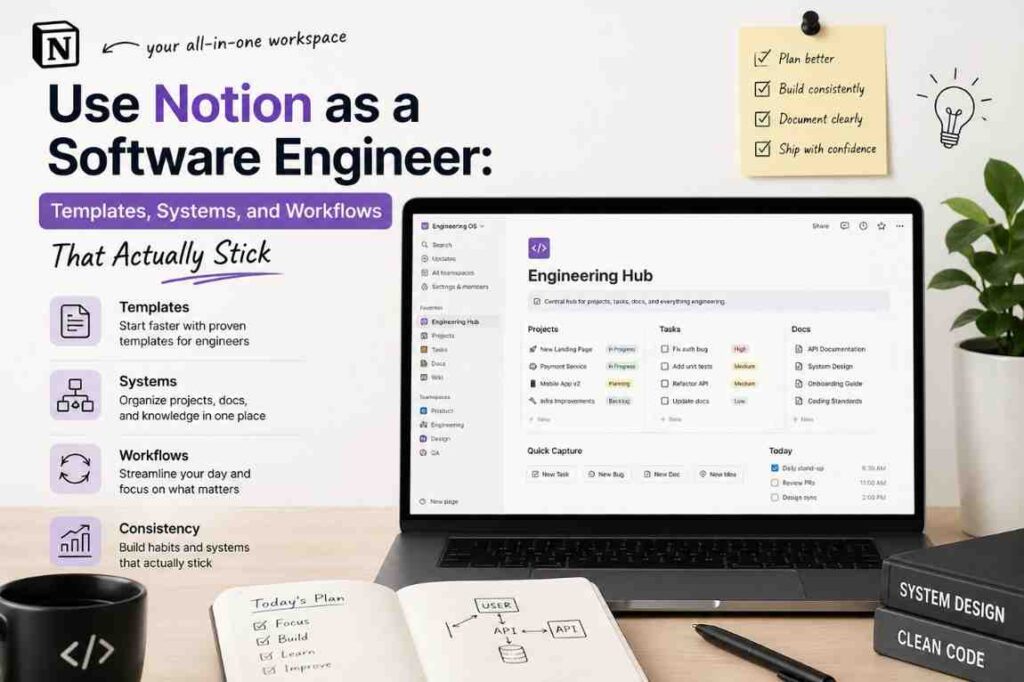
Your Master Dashboard is the homepage of your engineering life. Everything else links from here. A good software engineer dashboard should include:
- Active Projects — links to all ongoing work
- Daily Notes — a journal or standup log
- Learning Tracker — books, courses, tutorials you are going through
- Quick Links — frequently visited tools, repos, or documentation
To create this, open Notion, create a new page called “Engineering Hub” and start adding sections using headers (/h1, /h2, /h3) and inline links to subpages.
Step 2: Use the Right Page Types
Notion has two main building blocks: pages and databases. As a software engineer, here is when to use each:
| Use Case | Page or Database? |
|---|---|
| Meeting notes | Page |
| Bug tracker | Database |
| API documentation | Page |
| Sprint backlog | Database |
| Learning notes | Page or Database |
| Project roadmap | Database |
Databases are powerful because they let you filter, sort, and view data in different ways — table view, kanban board, calendar, gallery, and more.
Workflows That Make the System Stick
Building templates is easy. Actually using them consistently is the hard part. Here are workflows that help.
The Monday Setup (15 minutes)
Every Monday morning, open Notion before Slack or email, and do:
- Review last week’s dev log entries — What patterns do you see?
- Set this week’s sprint tasks — Drag in tasks for the week.
- Check your learning tracker — What are you making progress on?
The Friday Review (10 minutes)
Every Friday before logging off:
- Move completed tasks to Done — Clean up your Kanban.
- Write this week’s dev log entry — A brief summary.
- Add any new knowledge base entries — Things you learned this week.
The Capture Habit
Productivity researcher Tiago Forte calls this “capturing” — the habit of instantly adding new information to your system instead of trying to remember it. Whenever you:
- Solve a tricky problem → Add to Knowledge Base
- Learn a new command → Add to Knowledge Base
- Get a new task → Add to Sprint Board
- Read something useful → Add to Learning Tracker
The system only works if you feed it consistently.
Notion for Software Engineers: Team Use Cases
If you’re working in a team, Notion scales well. Here are ways engineering teams use it:
Engineering Wiki
Replace your scattered Confluence pages with a structured Notion wiki. Use a top-level Engineering Docs database with categories like Architecture, Onboarding, Runbooks, and API References.
Interview Prep Board
If you’re preparing for interviews, create a Notion database of LeetCode/system design problems with your notes, solutions, and patterns.

Incident Post-Mortems
Create a Post-Mortems database where every incident gets a page: timeline, root cause, impact, and action items. This becomes institutional knowledge.
Frequently Asked Questions
1. Why do software engineers use Notion?
Software engineers use Notion to organize tasks, manage projects, store technical notes, track learning progress, document systems, and improve productivity. Notion helps developers centralize everything from sprint planning to interview preparation in one workspace.
2. Is Notion good for software engineering workflows?
Yes, Notion is one of the best productivity tools for software engineering workflows because it combines documentation, databases, task management, and collaboration features. Developers can manage coding projects, debugging notes, APIs, and technical learning efficiently within a single system.
3. What are the best Notion templates for software engineers?
Some of the best Notion templates for developers include:
- Daily task manager
- Sprint planning dashboard
- Bug tracking system
- Developer knowledge base
- Interview preparation tracker
- Project roadmap template
- Coding notes wiki
- Learning dashboard
These templates help engineers stay organized and productive.
4. How can developers use Notion for project management?
Developers can use Notion for project management by creating dashboards to track tasks, deadlines, repositories, sprint goals, blockers, and feature progress. Notion databases make it easy to organize software projects and collaborate with teams.
5. Can Notion replace Jira or Trello for developers?
For personal workflows and small teams, Notion can replace tools like Jira or Trello. However, large engineering teams may still prefer dedicated agile project management platforms for advanced sprint tracking and issue management.
6. Is Notion useful for coding interview preparation?
Yes, Notion is excellent for coding interview preparation. Developers can organize DSA notes, system design concepts, behavioral interview answers, company-specific preparation strategies, and coding resources in one place.
7. Can Notion help improve developer productivity?
Yes, a properly designed Notion workflow can reduce mental overload, improve task visibility, centralize information, and help developers focus on deep work. Productivity improves when engineers spend less time searching for scattered information.
8. Is Notion good for tracking software engineering learning goals?
Absolutely. Developers can use Notion to track courses, certifications, coding practice, AI tools, cloud technologies, frontend frameworks, backend concepts, and personal growth goals.
Final Thoughts
Using Notion as a software engineer is not about building the most aesthetic or overly complicated productivity setup. The real purpose is to create a practical system that reduces friction in your daily workflow, organizes technical knowledge, and helps you maintain long-term consistency.
A sustainable Notion workspace should simplify engineering work — not add more complexity to it.
The best approach is to start small. Begin with a simple Daily Developer Log to track coding tasks, bugs, meeting notes, and learning progress. Once that workflow becomes natural, gradually expand your setup by adding systems like Sprint Boards, project trackers, and a centralized developer Knowledge Base. The most effective productivity systems are built iteratively, just like high-quality software: through continuous improvement driven by real usage and actual workflow needs.
Many developers fail with productivity tools because they try to design the “perfect setup” from day one. But long-term productivity comes from simplicity, usability, and consistency — not excessive dashboards or complicated automations.
As Tiago Forte explains in Building a Second Brain, the goal is not to capture every piece of information. The goal is to capture the right information and make it easily retrievable when you actually need it.
When built thoughtfully, your Notion workspace can become one of the most valuable tools in your engineering career. Not because it writes code, but because it helps you think clearly, stay organized, manage complexity, and operate more effectively as a software engineer.